The theme is in charge of the global layout or structure of a page (composition of the header, footer, left menu, main area...), as well as its branding or styling using resources like styling or JavaScript files.
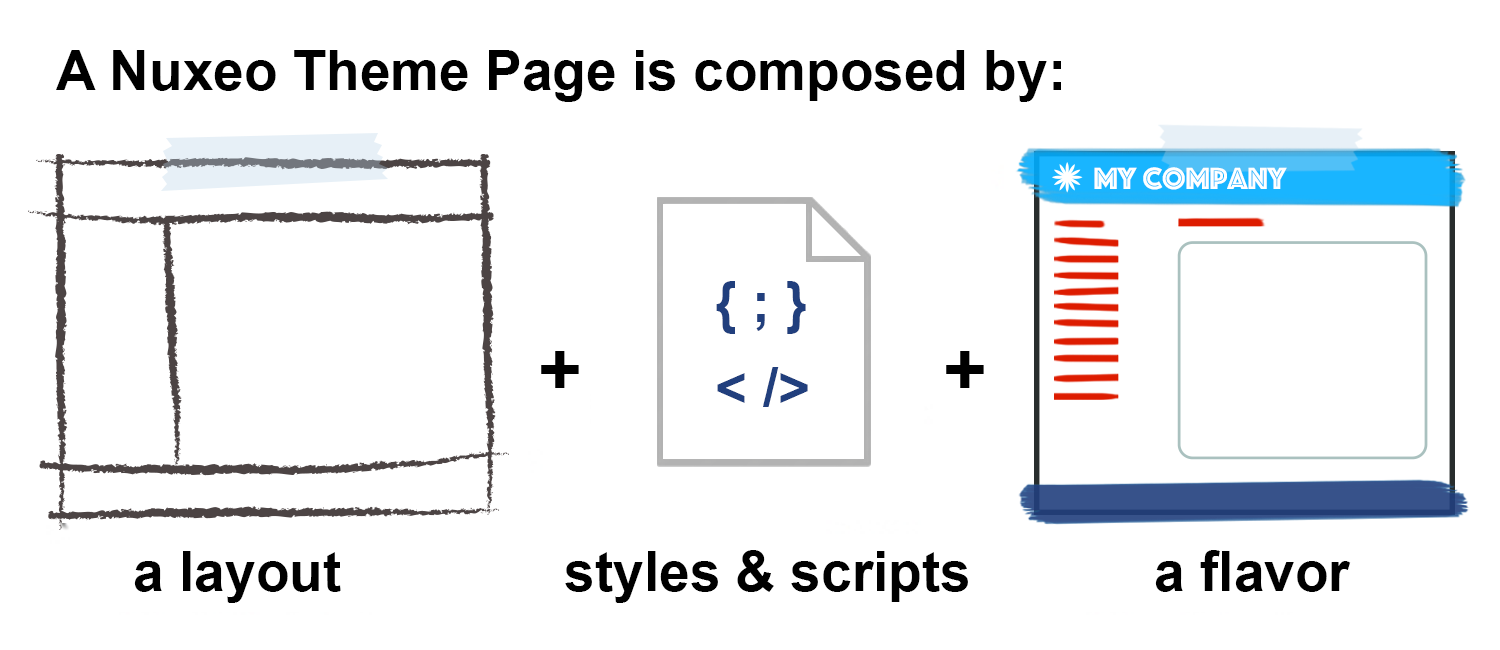
If you already understand theme concepts, maybe you'd like to check Theme and Style How-To Index.
Since 7.4, theme related configuration has changed: refer to Theme Upgrade to LTS 2015 for migration instructions.
The page layout is defined using XHTML template files. Some standard templates are defined in the default application, that can be reused.
The branding uses scss dynamic files and static css files.
An online UI Style Guide is available to help you design your pages, customize and style them.
Page Layout
When defining a new page, some default pages can be included to benefit from theme features. Here is a typical page example:
<ui:composition template="/pages/workspace_page.xhtml"
  xmlns="http://www.w3.org/1999/xhtml"
  xmlns:ui="http://java.sun.com/jsf/facelets">

  <ui:define name="page title">
    My page title
  </ui:define>

  <ui:define name="body">

<div class="mainFragment">
      My page content
    </div>
  </ui:define>

</ui:composition>
The template at /pages/workspace_page.xhtml inserts a few templating zones that can be defined by the caller (in above example, page title and body).
Let's describe in more details two different default pages so that you can define your own custom pages taking example on them.
Workspace Page Example
The Workspace page is the standard default page, showing a header and a footer, as well as a left column (showing the import button, document explorer, clipboard...):
<ui:composition template="/pages/basic_page.xhtml"
  xmlns="http://www.w3.org/1999/xhtml"
  xmlns:ui="http://java.sun.com/jsf/facelets">
  <ui:param name="pageName" value="#{themeActions.currentPage}" />
  <ui:param name="pageFlavor" value="#{themeActions.currentFlavor}" />

  <ui:define name="basic body includes">
    <ui:include src="/incl/includes.xhtml" />
  </ui:define>

  <ui:define name="basic body">

    <ui:decorate template="/pages/header_footer_template.xhtml">
      <ui:define name="main content">

<div class="column">
          <ui:include src="/incl/import.xhtml" />
          <ui:include src="/incl/multi_tree_explorer.xhtml" />
          <ui:include src="/incl/user_clipboard.xhtml" />
        </div>

<div class="content">
          <ui:include src="/incl/breadcrumb.xhtml" />
          <ui:insert name="body" />
        </div>

<div class="clear" />
      </ui:define>
    </ui:decorate>

  </ui:define>

</ui:composition>
- This template relies on another generic template,
/pages/basic_page.xhtml, that defines the global HTML page, and inserts a few templating zones (likebasic body). - The current page and flavor are retrieved thanks to the themeActions Seam component logics, which rely on negotiations (see below). The corresponding resources will be included in the page head thanks to the
/incl/page_head.xhtmltemplate. - The template at
/incl/includes.xhtmlis also inserted in the page body, and is useful for Drag&Drop features.
Popup Page Example
The Popup page page is the standard popup page, not showing any header or footer:
<ui:composition template="basic_page.xhtml"
  xmlns="http://www.w3.org/1999/xhtml"
  xmlns:ui="http://java.sun.com/jsf/facelets">
  <ui:param name="pageName" value="galaxy/popup" />
  <ui:param name="pageFlavor" value="#{themeActions.getCurrentFlavor(pageName)}" />

  <ui:define name="basic body includes">
    <ui:include src="/incl/includes.xhtml" />
  </ui:define>

  <ui:define name="basic body">

    <section class="nxMainContainer">
      <ui:insert name="body" />
    </section>

  </ui:define>

</ui:composition>
This template uses an hardcoded page name, but still relies on undefined for current flavor resolution.
Mechanism to Defer Parsing of JavaScript in JSF Pages
Default page templates rely on a mechanism to control where resources are included on the page. This allows to optimize the rendering of the page by:
- declaring CSS resources first in the page head
- pushing most of JavaScript resources to end of the page body
This relocation of tags relies on JSF 2 re-target features, and moves around components to place them inside slots defined on the /pages/basic_page.xhtml template.
By default, standard JavaScript resources like JSF or RichFaces Javascript files, as well as jQuery, are kept at the beginning of the body. However, most of Nuxeo default resources are pushed to the end of the page body. As a consequence, to benefit from these optimizations, inline JavaScript files should be declared using a h:outputScript tag instead of a bare script HTML tag, using variable #{pageJsTarget} as a target attribute:
<h:outputScript target="#{pageJsTarget}">
  jQuery(document).ready(function() {
    jQuery("#dropDownMenu").dropdown();
  });
</h:outputScript>
This mechanism is controlled by an application property, here is a sample contribution to avoid pushing JavaScript resources at the end of the body tag:
<require>org.nuxeo.ecm.platform.webapp.base.properties</require>
<component name="my.contribution">
  <extension target="org.nuxeo.runtime.ConfigurationService" point="configuration">
    <property name="nuxeo.jsf.deferJavaScriptLoading">false</property>
  </extension>
</component>
Branding and Resources
Resources can be inserted directly inside each template. But some addons need to add styling and JavaScript to existing pages without changing the global structure of the page, or overriding the original XHTML template: for modularity reasons, these resources are contributed to dedicated runtime extension points that support override and merging.
Pages
Each page using the basic_page.xhtml template needs to have a page contribution to the pages extension point: this is the main link between the page structure and its branding.
Here is an example of the galaxy/default default page definition:
<extension target="org.nuxeo.theme.styling.service" point="pages">
  <page name="galaxy/default" charset="utf-8">
    <defaultFlavor>default</defaultFlavor>
    <flavors>
      <flavor>default</flavor>
      <flavor>rainbow</flavor>
    </flavors>
    <resources>
      <bundle>nuxeo_includes</bundle>
      <bundle>nuxeo_base</bundle>
      <bundle>nuxeo_sassCss</bundle>
      <bundle>nuxeo_dm</bundle>
      <resource>my_js.js</resource>
      <resource>my_style.css</resource>
    </resources>
  </page>
</extension>
<defaultFlavor>refers to the default flavor used for the page. See below forflavordefinition.<flavors>refers to the different flavors available for this page. If the computed current flavor is not is this list, the default flavor will be used. Theflavorselement should hold an additional attributeappend="true"when contributing new flavors to an existing page.<resources>refers to SCSS/CSS/JavaScript resources and bundles. See below forresourcesandbundlesdefinitions. Theresourceselement should hold an additional attributeappend="true"when contributing new resources or bundles to an existing page.
Resources
Resources that need to be included on a page need to define a resource contribution to the resources extension point. Resources define mainly a name and a type, here are sample contributions:
<extension target="org.nuxeo.ecm.platform.WebResources" point="resources">
  <resource name="popup-utils.js">
    <uri>/scripts/popup-utils.js</uri>
  </resource>
  <resource name="video-js.css">
    <uri>/css/video-js.css</uri>
  </resource>
</extension>
Here the resource type is inferred from the resource name extension: it ends by ".css" for CSS files, and ".js" for JavaScript files. It can also be set explicitly on the resource element:
<extension target="org.nuxeo.ecm.platform.WebResources" point="resources">
  <resource name="popup-utils.js" type="js">
    <uri>/scripts/popup-utils.js</uri>
  </resource>
  <resource name="body.scss" type="css">
    <path>/sass/body.scss</path>
    <processors>
      <processor>sassCss</processor>
    </processors>
  </resource>
  <resource name="video-js.css" type="css">
    <uri>/css/video-js.css</uri>
  </resource>
</extension>
Several kinds of URIs are accepted to reference the resource location. Please refer to the wro4j documentation or the extension point documentation for details.
Here files will be retrieved from the generated WAR directory (nuxeo.war) so you should make sure that the OSGI-INF/deployment-fragment.xml file of your module copies the files from the JAR there.
Alternatively, the path element can be used to reference the resource in the current JAR:
<extension target="org.nuxeo.ecm.platform.WebResources" point="resources">
  <resource name="popup-utils.js" type="js">
    <path>scripts/popup-utils.js</path>
  </resource>
  <resource name="body.scss" type="css">
    <path>sass/body.scss</path>
    <processors>
      <processor>sassCss</processor>
    </processors>
  </resource>
  <resource name="video-js.css" type="css">
    <path>css/video-js.css</path>
  </resource>
</extension>
Here is the hierarchy of files in the JAR for above use case:
.
└── src
    └── main
        └── resources
            ├── sass
            │   └── body.css
            ├── css
            │   └── video-js.css
            └── scripts
                └── popup-utils.js
When defining styles and JavaScript resources, you do not need to worry about using minimized versions: unless Nuxeo dev mode is enabled, all resources will be minimized by default.
Resource Bundles
Bundles are a group of ordered resources. Bundles that need to be included on a page need to define a bundle contribution to the bundles extension point:
<extension target="org.nuxeo.ecm.platform.WebResources" point="bundles">
  <bundle name="nuxeo_includes">
    <resources>
      <resource>nuxeo.js</resource>
      <resource>nuxeo.scss</resource>
      <resource>custom.css</resource>
      [...]
    </resources>
  </bundle>
</extension>
The theme engine concatenates all the stylesheets in the order of their declaration to build one big stylesheet named myCustomTheme-styles.css.
Beware of the cascade!
For example a very specific stylesheet as my_custom_styles.css should come after the very generic header.css.
Bundles accept merge by adding an attribute append="true" to the resources element.
Also, most of Nuxeo default pages should already use the nuxeo_includes bundle (gathering most of JavaScript resources used throughout the default application), so contributing a new resource to it is a good way of making sure this resource will be present on all pages:
<extension target="org.nuxeo.ecm.platform.WebResources" point="bundles">
  <!-- Require the contribution defining the bundle -->
  <require>org.nuxeo.theme.nuxeo.webapp</require>
  <bundle name="nuxeo_base">
    <resources append="true">
      <resource>my_custom_styles.css</resource>
    </resources>
  </bundle>
</extension>
If you'd like to include all resources of a given bundle inside an XHTML page, without declaring this bundle on the page element (because there is no other template where these resources will be used, for instance), you can use the following tag:
<ui:fragment
  xmlns="http://www.w3.org/1999/xhtml"
  xmlns:ui="http://java.sun.com/jsf/facelets"
  xmlns:nxr="http://nuxeo.org/nxweb/resources">

  <nxr:bundle name="my_bundle">
    <f:param name="flavor" value="default" />
  </nxr:bundle>

  [...]

</ui:fragment>
This will generate the following HTML code:
<link type="text/css" rel="stylesheet" href="/nuxeo/wro/api/v1/resource/bundle/my_bundle.css?flavor=default" />
<script type="text/javascript" src="/nuxeo/wro/api/v1/resource/bundle/my_bundle.js?flavor=default"></script>
Resource Types
Main resources types are scss, css and js. But other types can also be used on the JSF interface for automatic inclusion using the nxr:bundle tag:
- SCSS and CSS resources will be gathered in a single file and served by the wro servlet
- JavaScript resources will be gathered in a single file and served by the wro servlet
- HTML resources will be included on the page using an HTML import tag
Resources using type
jsfjsorjsfcsswill be included as JSF resources:<extension target="org.nuxeo.ecm.platform.WebResources" point="resources"> <resource name="widget-utils.js" type="jsfjs"> <uri>org.nuxeo:widget-utils.js</uri> <require>richfaces-queue.js</require> </resource> </extension>The
urischeme islibrary_name:resource_name.Resources using type
xhtmlorxhtmlfirstwill be included in the page head. This is useful when some resources depend on contextual parameters, resolved inside the XHTML template context. Resources of typexhtmlfirstwill be included before any other types of resources inside a given bundle. Resources of typexhtmlwill be included after any other types of resources inside a given bundle.
Flavors
The notion of flavor makes it possible to switch some elements held by the branding (colors, logo...) without changing the associated styles: negotiators make it possible to compute this flavor depending on the context, so that, for instance, branding can be customized when navigating in some parts of the document hierarchy, relying on Nuxeo local configuration features.
Each flavor needs to have a flavor contribution to the flavors extension point.
Here is an example of the default flavor:
<extension target="org.nuxeo.theme.styling.service" point="flavors">
  <flavor name="default">
    <sass>
      <import src="themes/palettes/common_variables.scss" />
      <import src="themes/palettes/default_variables.scss" />
     </sass>
    <label>label.theme.flavor.nuxeo.default</label>
    <palettePreview>
      <colors>
        <color>#cfecff</color>
        <color>#70bbff</color>
        <color>#4e9ae1</color>
        ...
      </colors>
    </palettePreview>
    <logo>
      <path>/img/nuxeo_logo.png</path>
      <previewPath>/img/nuxeo_preview_logo_black.png</previewPath>
      <width>92</width>
      <height>36</height>
      <title>Nuxeo</title>
    </logo>
    <links>
      <icon name="icon">/icons/favicon.png</icon>
      <icon name="shortcut icon">/icons/favicon.ico</icon>
    </links>
  </flavor>
</extension>
common_variables.scsscontains all the variables that are not meant to be customizabled by users: neutral gray backgrounds, border radius, etc.default_variables.scsscontains all the variables that are customizable by users in Studio: main colors and backgrounds, font family, etc.sasscontributions define a list of scss variables that can be reused in several places in the SCSS files. For example inthemes/palettes/common_variables.scsswe can define:// Fonts $font-color: #42444e; $title: #213f7d;These variables can be used in a dynamic SCSS file, using the pattern
$variable-nameand will be translated in CSS by:html, body { color: #42444e;} h1 { color: #213f7d;}<label>and<palettePreview>are used to display the flavor in the Theme local configuration.<logo>is used to display the current logo associated to current flavor thanks to the template at/incl/nuxeo_logo.xhtml(included in Nuxeo default header).
SCSS resources referencing variables will need to declare the Sass processor to be triggered:
<extension target="org.nuxeo.ecm.platform.WebResources" point="resources">
  <resource name="buttons_and_actions.css">
    <path>themes/css/buttons_and_actions.css</path>
    <processors>
      <processor>sassCss</processor>
    </processors>
  </resource>
</extension>
Before 7.4, CSS files referencing flavor variables needed to be referenced as resources in the JAR. This is not the case anymore: and that kind of CSS files can also be placed in the resulting WAR directory.
Processors
Custom processors can be defined and used. Some default processors are also available, you can refer to the processors extension point and take example on the custom FlavorResourceProcessor implementation and registration.
Negotiations
You can contribute custom negotiators to the negotiations extension point to customize current page or flavor logics.