routes extension point are introduced in Nuxeo
2025.16. Until then, only the legacy event extension point is available.
The legacy event extension point still works and remains backward-compatible
on later releases.
The AuditRouter is the engine that decides, for each Nuxeo event, which Audit
Backend(s) the resulting LogEntry is written to. It is configured through the
routes extension point of the Audit Service.
How Routing Works
The audit ingestion pipeline goes through three stages:
- The
StreamAuditEventListenerintercepts each audited event, asks theAuditRouterto compute the resultingLogEntryfrom the event context, and the listener appends it to theaudit/auditNuxeo Stream. - The
audit/writercomputation (StreamAuditWriter) consumes theaudit/auditstream entries. - For every entry, the computation calls the
AuditRouterback to get the list of target backends. The router walks the contributed routes and, for every route that matches the entry, returns the configured backend. The entry is then written to each matching backend.
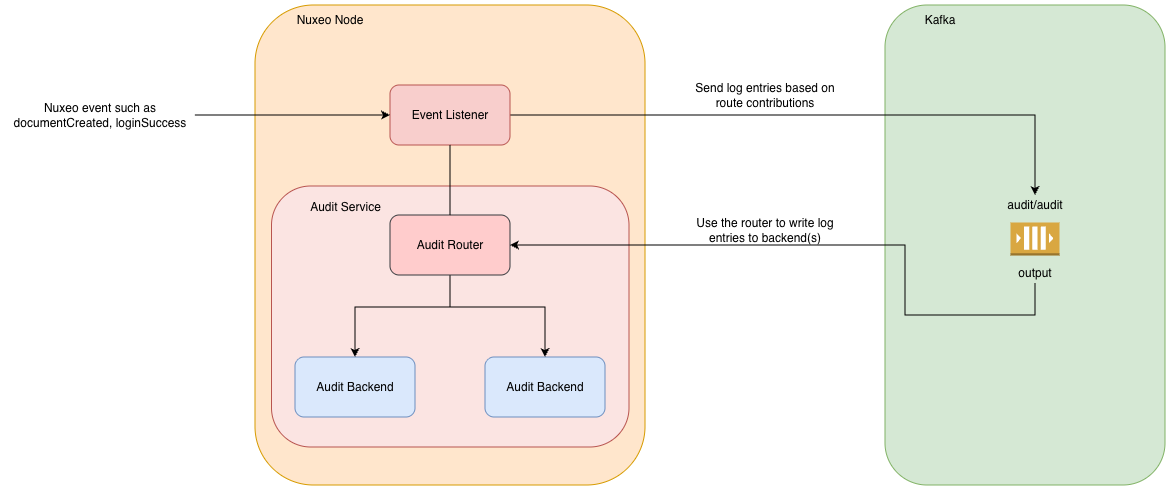
The combination semantics are:
- routes are ORed: a single log entry can be written to several backends if several routes match.
- events of one route are ORed.
- predicates of one route are ORed.
- events AND predicates are combined inside a single route: a route declaring both accepts an entry only when one of its events matches and one of its predicates is satisfied.
A route may declare only events, only predicates, or both:
- Events only — the events declared in the route are registered as auditable events,
so the post-commit listener forwards them to the
audit/auditstream. - Predicates only — the route does not register events; it only filters log entries that already flow through the router (for example, to copy entries flowing to the default backend to a secondary one based on their category).
routes Extension Point
A route is a <route> element with a name, a <backend> and any
combination of <event> and <predicate> children:
<extension target="org.nuxeo.audit.service.AuditComponent" point="routes">
  <route name="default">
    <backend name="default" />
    <event name="documentCreated" />
    <event name="documentModified" enabled="true" />
  </route>
</extension>
By default the Nuxeo Platform contributes a default route holding all auditable events. Custom contributions to the routes extension point can override or extend this configuration.
live
live attribute is introduced in Nuxeo 2025.26.
<route name="..." live="true|false"> controls whether the route is
evaluated for incoming events. It defaults to true.
A live="false" route is excluded from the live routing path described above,
but it remains addressable by name, for instance to be used by the
Audit Purge mechanism. This lets
you declare purge-only or archive routes that never fire on new events but can
still be triggered explicitly through POST /management/audit/purge.
<backend>
<backend name="..."/> references a backend registered through the
backendFactory extension point. The platform always contributes a default
backend whose factory comes from nuxeo.audit.backend.default.factory.
<event>
<event name="..." enabled="true|false"/> registers an auditable event.
- The event must be one of the events fired by the platform (or by your code).
- Setting
enabled="false"is the supported way to suppress an event from a route without redefining it; this is how the SQL backend disablessearchby default.
<predicate>
<predicate class="..."/> filters which log entries the route accepts. A
predicate is a java.util.function.Predicate<LogEntry> that takes a
Map<String, String> of <property> entries as constructor argument:
<route name="documentCategory">
  <backend name="default" />
  <predicate class="org.nuxeo.audit.service.route.CategoryLogEntryPredicate">
    <property name="category">eventDocumentCategory</property>
  </predicate>
</route>
The platform ships CategoryLogEntryPredicate, which keeps log entries whose
category matches the configured value. You can contribute your own
Predicate<LogEntry> implementation by providing a public constructor that
accepts a Map<String, String>.
NXQLPredicate is introduced in Nuxeo 2025.26.
The platform also ships NXQLPredicate, which evaluates an NXQL query
property against each LogEntry in-memory (no backend round-trip). The query
is parsed and validated once, at contribution time, so a typo or unsupported
construct fails fast at deployment rather than at routing time:
<route name="archive-old-login-success" live="false">
<backend name="archive" />
<predicate class="org.nuxeo.audit.service.route.NXQLPredicate">
<property name="query">SELECT * FROM LogEntry WHERE eventId = 'loginSuccess' AND eventDate < DATE '2025-01-01'</property>
</predicate>
</route>
It supports a subset of NXQL: =, !=, <, <=, >, >=, IN,
BETWEEN, LIKE, STARTSWITH, IS NULL, and boolean AND / OR / NOT, as well as
NOW() with an optional ISO-8601 period/duration argument (for example, NOW('-P1D')
for "one day ago"). Within a single bulk action run (for instance one
POST /management/audit/purge call), every NOW() evaluation is pinned to
the same instant so results stay consistent across all scrolled entries.
NotRoutesPredicate is introduced in Nuxeo 2025.26.
The platform also ships NotRoutesPredicate, which matches a LogEntry only
if none of the named routes it references (comma-separated, live or not)
would themselves match it. This lets a route defer to another route's
criteria instead of duplicating them — typically to express an archive route
as "everything the future default route does not keep":
<route name="future-default-route" live="true">
<backend name="future-default" />
<predicate class="org.nuxeo.audit.service.route.NXQLPredicate">
<property name="query">SELECT * FROM LogEntry WHERE NOT (eventId = 'loginSuccess' AND eventDate < NOW('-P30D'))</property>
</predicate>
</route>
<route name="archive-route" live="false">
<backend name="archive" />
<predicate class="org.nuxeo.audit.service.route.NotRoutesPredicate">
<property name="routes">future-default-route</property>
</predicate>
</route>
Route Inheritance with copy
A route can copy another existing route by referring to it via the copy
attribute. The copying route inherits the backend and the events/predicates
of the source route, and merges them with what it declares locally:
- Locally declared
<event>and<predicate>elements are merged with the inherited ones (entries are identified byname). A local<event name="..." enabled="false"/>disables a specific inherited event. - The
<backend>is replaced when redeclared.
<route name="default-mirrored" copy="default">
  <backend name="secondary" />
</route>
Worked Example — Routing a Business Event to a Secondary Backend
The following example contributes a secondary OpenSearch 1.x backend that
receives only the custom hylandBusinessEvent event. The default backend is
left untouched: it keeps receiving the events declared by the implicit
default route, and it does not receive hylandBusinessEvent.
1. Register the secondary backend
<extension target="org.nuxeo.audit.service.AuditComponent" point="backendFactory">
  <backend name="secondary" factory="org.nuxeo.audit.opensearch1.OpenSearchAuditBackendFactory" />
</extension>
2. Configure the backend implementation
<extension target="org.nuxeo.audit.opensearch1.OpenSearchAuditBackendFactory" point="backend">
  <backend name="secondary"
           clientId="audit/secondary"
           indexName="${hyland.custom.audit.backend.secondary.opensearch1.index.name:=hyland-business-audit}" />
</extension>
3. Configure the OpenSearch client used by the secondary backend
<extension target="org.nuxeo.runtime.opensearch1.OpenSearchComponent" point="client">
  <client id="audit/secondary">
    <server>${hyland.custom.audit.backend.secondary.opensearch1.client.server:=http://localhost:9200}</server>
    <connectionTimeout>${hyland.custom.audit.backend.secondary.opensearch1.client.connectionTimeout:=30s}</connectionTimeout>
    <socketTimeout>${hyland.custom.audit.backend.secondary.opensearch1.client.socketTimeout:=121000ms}</socketTimeout>
    <username>${hyland.custom.audit.backend.secondary.opensearch1.client.username:=}</username>
    <password>${hyland.custom.audit.backend.secondary.opensearch1.client.password:=}</password>
  </client>
</extension>
4. Contribute the route
<extension target="org.nuxeo.audit.service.AuditComponent" point="routes">
  <route name="secondary_route">
    <backend name="secondary" />
    <event name="hylandBusinessEvent" />
  </route>
</extension>
From now on, every hylandBusinessEvent raised by the application is ingested
by the secondary OpenSearch backend, while regular events keep flowing to the
default backend.
nuxeo.conf and
disable the other one, for instance:
# default backend is SQL
nuxeo.audit.backend.default.factory=org.nuxeo.audit.sql.SQLAuditBackendFactory
# secondary OpenSearch package must not register itself as default
nuxeo.audit.backend.default.opensearch1.enabled=false