The legacy SQL Audit Backend stores log entries in a relational database using JPA / Hibernate. It is intended for small deployments only.
Installation
Install the nuxeo-audit-sql Marketplace Package.
It deploys the sql-audit template, which sets
nuxeo.audit.backend.default.factory to
org.nuxeo.audit.sql.SQLAuditBackendFactory.
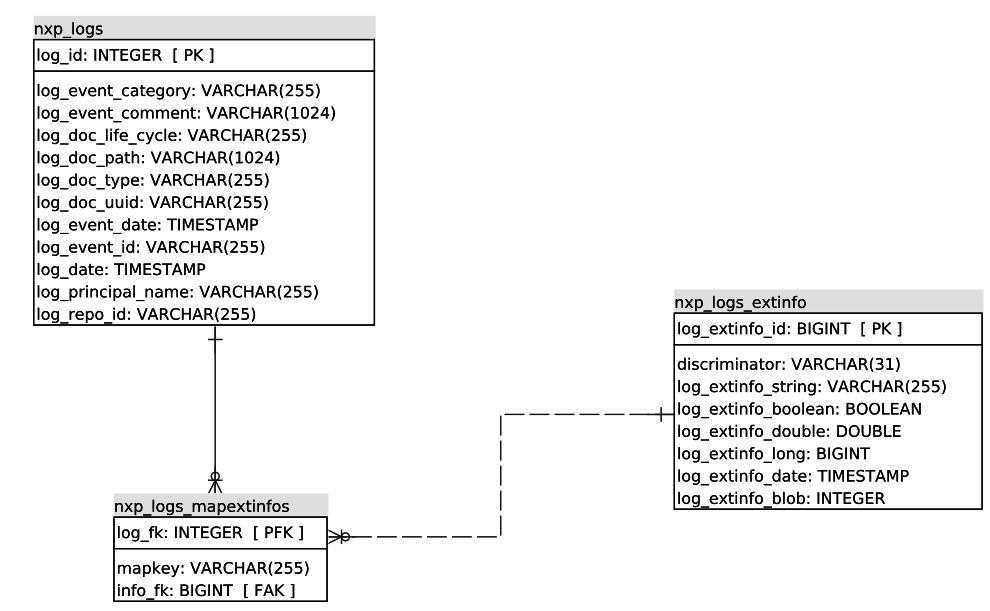
The LogEntry and ExtendedInfo Java classes are mapped onto the datastore
using JPA (Java Persistence API) annotations. Three tables are used by the
backend:
NXP_LOGS— the main table, used most of the time.NXP_LOGS_EXTINFONXP_LOGS_MAPEXTINFOS
The two *EXTINFO* tables are populated only when the extendedInfo extension
point is contributed.
Hibernate Configuration
The SQL Audit Backend uses Hibernate as a JPA provider. The configuration is
done in the hibernate extension point of the
org.nuxeo.ecm.core.persistence.PersistenceComponent target. This extension
point lets you override the default Hibernate configuration.
<extension target="org.nuxeo.ecm.core.persistence.PersistenceComponent" point="hibernate">
  <hibernateConfiguration name="nxaudit-logs">
    <datasource>nxaudit-logs</datasource>
    <properties>
      <property name="hibernate.hbm2ddl.auto">update</property>
    </properties>
  </hibernateConfiguration>
</extension>
Search Behavior
The default audit route shipped with this package disables the search event
to avoid storing every search query in the SQL database:
<extension target="org.nuxeo.audit.service.AuditComponent" point="routes">
  <route name="default">
    <event name="search" enabled="false" />
  </route>
</extension>
Re-enable it explicitly if you need the search event audited on the SQL backend.